About This Guide
Over the past several years, Dapt has worked hands-on with more than 200 companies across different industries—from construction and manufacturing to healthcare, nonprofits, and professional services—to automate and standardize payroll accounting. Through that work, we’ve seen every variation of how payroll connects (and sometimes fails to connect) with accounting systems. Each implementation taught us something new about the flow of data, the structure of accounts, and the realities of closing the books each month.
Over time, we began to see payroll accounting differently. Because we process the data ourselves, we experience it not just as a set of journal entries, but as a continuous flow — one that has to stay balanced across time tracking, payroll, and accounting systems. That gave us a view that blends three perspectives: the data orchestration perspective of moving information cleanly across systems, the business perspective of analyzing labor costs and simplifying operations, and the accounting perspective of ensuring every transaction lands in the right place.
That combination of experiences has shaped how we think about payroll accounting today. What began as a series of technical challenges has evolved into a deeper understanding of how people, processes, and systems all have to align to produce reliable, real-time financial clarity.
This guide captures what we’ve learned along the way. It’s the culmination of years spent in the details — reconciling accounts, fixing integrations, refining workflows — all with one goal in mind: to make payroll accounting as accurate, automated, and insightful as it can be.
Executive Summary
Payroll accounting often begins as a task of compliance—ensuring wages, taxes, and filings are accurate and on time. Over time, through our work with hundreds of businesses, we’ve come to see it differently. When payroll accounting is structured the right way, it becomes the engine behind one of the most valuable financial insights a company can have: a profit and loss statement by job that reflects the true, fully burdened cost of labor.
When payroll data flows cleanly across systems, it reveals the real story behind labor costs—how much each hour truly costs, where that time is spent, and how it impacts profitability. A well-designed payroll accounting structure doesn’t just meet compliance requirements—it connects the dots between people, projects, and performance.
This guide takes a deep dive into both sides of payroll accounting:
-
Labor Cost Allocation – How to set up your chart of accounts and allocation methods to reflect the true cost of labor.
-
Payroll Reconciliation – How to design liability accounts and processes that keep your books clean, auditable, and aligned with real-world disbursements.
-
Job Costing and Automation – How to break down costs with meaningful detail and use automation to make the process scalable and repeatable.
By the end, you’ll understand how to transform payroll from an administrative task into a closed-loop labor cost and profitability system—one that provides continuous financial clarity, supports strategic decision-making, and enables operational excellence.
Introduction
This guide turns payroll accounting from theory into practice. It explains how payroll becomes a continuous source of truth—showing how labor costs are captured, payroll liabilities are cleared, and results flow into job-level profitability and financial reporting.
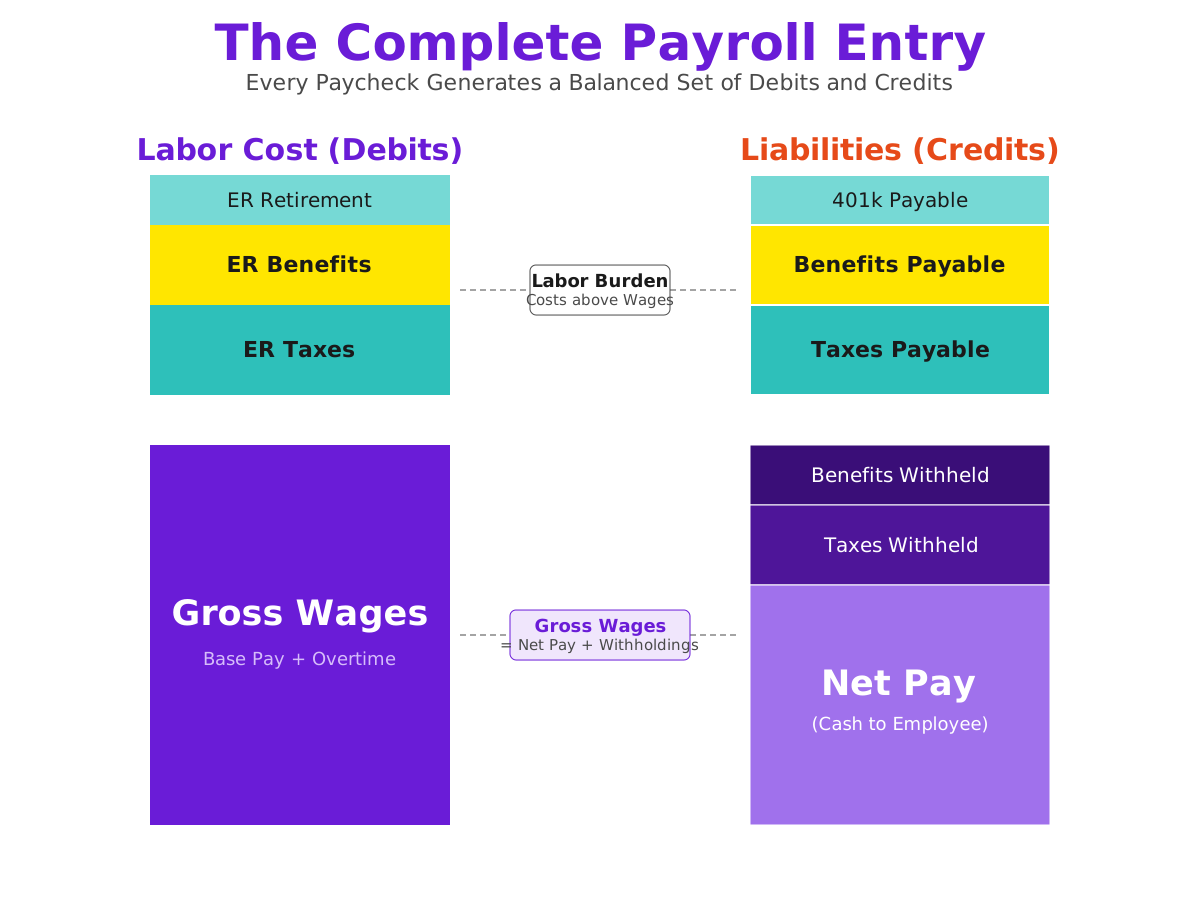
At its core, payroll accounting has two complementary goals. Together, they form a closed system that connects time worked, wages paid, and financial outcomes.
Labor Cost Accounting (Debit Side)
Labor cost accounting focuses on capturing the full, burdened cost of labor—including wages, employer taxes, and benefits—and allocating those costs to the jobs, projects, or programs that drive the business. This is the foundation for accurate job costing, margin analysis, and operational decision-making.
Payroll Reconciliation (Credit Side)
Payroll reconciliation ensures that every wage, tax, and benefit payment aligns cleanly with the liabilities recorded in the general ledger. Proper setup and reconciliation of payroll liability accounts ensures payroll clears correctly each cycle and supports auditability and financial accuracy.
A Closed Financial Loop
When labor cost accounting and payroll reconciliation work together, payroll stops being an isolated administrative process. Instead, it becomes part of a closed financial loop: every hour worked, every dollar paid, and every job costed flows through the same data stream—accurate, auditable, and ready for analysis.
The sections that follow walk through how to achieve this in practice: how to set up payroll and liability accounts, allocate labor costs effectively, reconcile payroll activity each period, and use automation to keep everything synchronized and scalable.
Labor Cost Allocation and Accounting
First, we're going to tackle how labor costs are accounted for in your P&L. Getting this right sets the foundation for everything that follows. By including all elements of labor—wages, employer taxes, and benefits—you'll ensure that your P&L reflects the fully burdened cost of labor and reveals the true profitability of each job, department, or project.
Accurate labor cost allocation brings financial clarity to how your team's work creates value. It connects the dollars you spend on people to the revenue those people generate. Without it, margins appear distorted, overhead is overstated, and job-level profitability becomes impossible to measure with confidence.
Direct vs. Indirect Costs (COGS/COS vs. Expenses)
The first step is distinguishing between direct and indirect labor costs. This distinction defines how payroll expenses flow into your chart of accounts and directly affects how profitability appears in your financial statements.
-
Direct Labor (COGS or COS)
Labor tied directly to revenue-producing activities. This includes job-site workers in construction, production staff in manufacturing, or billable professionals in service businesses. These costs belong in Cost of Goods Sold (COGS) or Cost of Sales (COS) accounts because they are incurred in producing what the business sells. -
Indirect Labor (Operating Expenses/Overhead)
Labor that supports the business but cannot be tied to a specific job or sales activity—administrative staff, managers, HR, or salespeople. These costs are recorded as Operating Expenses because they represent the cost of running the business, not producing its goods or services.
By separating direct and indirect labor, your financial statements tell a clearer story. Gross profit reflects the true cost of delivering your product or service, while operating expenses show what it takes to keep the business running.
Example Chart of Accounts Setup
Your chart of accounts should mirror this distinction. Each set of accounts—direct and indirect—should include every element of labor cost: wages, employer payroll taxes, and employer-paid benefits. This ensures labor is represented in full rather than piecemeal.
Direct Labor (COGS / COS)
| Account No. | Account Name | Classification |
|---|---|---|
| 5000 | Direct Labor | Cost of Goods Sold |
| 5020 | Employer Payroll Taxes – Direct | Cost of Goods Sold |
| 5040 | Employee Benefits – Direct | Cost of Goods Sold |
Indirect Labor (Operating Expenses)
| Account No. | Account Name | Classification |
|---|---|---|
| 6000 | Indirect Labor | Operating Expense |
| 6020 | Employer Payroll Taxes – Indirect | Operating Expense |
| 6040 | Employee Benefits – Indirect | Operating Expense |
Capturing all components of labor cost under the correct category ensures your P&L reflects the real cost of the work performed—both for jobs that generate revenue and for the operations that support them.
Quick Reference: Direct vs. Indirect Labor
| Category | Description | Examples | Account Placement |
|---|---|---|---|
| Direct Labor | Costs directly tied to producing goods or delivering services | Construction workers, production staff, billable consultants | COGS / COS Accounts (5000–5099 series) |
| Indirect Labor | Labor that supports operations but is not directly tied to production | Administrative staff, managers, HR, salespeople | Operating Expense Accounts (6000–6099 series) |
Note:
Direct labor is recorded under Cost of Goods Sold (COGS) or Cost of Services (COS) accounts because it directly contributes to revenue-producing activities.
Indirect labor, on the other hand, is classified as an Operating Expense since it supports the business but does not directly generate billable work.In a job costing system, properly distinguishing between direct and indirect labor ensures that project profitability and overhead rates are calculated accurately.
Summary: How Labor Costs Flow Through the P&L
| Step | Description | Example Accounts | Effect on Profitability |
|---|---|---|---|
| 1️⃣ Revenue Earned | Income from completed jobs or services | 4000 – Job Income | — |
| 2️⃣ Direct Labor Costs | Wages, taxes, and benefits tied to revenue-producing work | 5000–5040 (COGS/COS) | ↓ Reduces Gross Profit |
| 3️⃣ Indirect Labor Costs | Payroll for administrative, management, and support roles | 6000–6040 (Operating Expenses) | ↓ Reduces Operating Profit |
Key Takeaway:
Direct labor determines job-level profitability, while indirect labor determines organizational efficiency.
Together, they shape the company’s overall financial performance.
This separation ensures your Profit & Loss statement clearly distinguishes between the costs that drive production and those that support operations—laying the groundwork for accurate job costing and automation in later steps.
Applying the Concepts: Recording Payroll in Practice
In practice, payroll costs are typically recorded automatically through payroll items mapped to the appropriate accounts.
Each component—wages, employer taxes, and benefits—should link directly to its corresponding account.
This ensures that payroll runs post cleanly into your books and that the total labor cost for each pay period is properly captured in both job costs and overhead.
Tip:
Properly mapping payroll items ensures your books reflect the complete cost of labor—not just wages.
This allows you to measure true job profitability and understand the real cost of running your business.
However, as soon as you begin tracking payroll by employee and job, the number of required accounting entries grows rapidly.
⚠️ Reality Check: Manual Posting Explodes Quickly
Using the examples in this chapter:
- Carlos Ramirez example: 2 jobs × 4 components (wages, payroll taxes, benefits, workers’ comp) = 8 debit lines, plus the matching liability and cash credits.
- Small crew example (4 employees): 6 job allocations × 4 components = 24 debit lines per run, before credits for wages payable, taxes payable, and benefits payable (another 3–8 lines). That’s already ~30–35 lines for a small team.
- Five-job period example: 5 jobs × 3 direct components (wages, employer taxes, benefits) = 15 debit lines, plus indirect and credit entries → ~30+ lines total.
- Scaling up: With 25 employees working 2 jobs each → 50 allocations × 4 components = 200 debit lines per run. On a weekly cadence, that’s 10,000+ debit lines per year before adjustments or corrections.
Bottom line: Without automation, this level of detail becomes unmanageable—slowing close, increasing errors, and obscuring margins.
With Dapt, those same detailed allocations are generated automatically and posted as structured journal entries for full reconciliation.
Every job, employee, and cost component remains transparent—without adding manual workload or sacrificing auditability.
Example Pay Period
| Category | Type | Amount |
|---|---|---|
| Direct Wages | Direct Labor (COGS/COS) | $30,000 |
| Direct Employer Taxes | Employer Payroll Taxes – Direct | $2,250 |
| Direct Benefits | Employee Benefits – Direct | $3,000 |
| Indirect Wages | Indirect Labor (Operating Expense) | $12,000 |
| Indirect Employer Taxes | Employer Payroll Taxes – Indirect | $900 |
| Indirect Benefits | Employee Benefits – Indirect | $1,350 |
| Total Labor Cost | — | $49,500 |
Job Cost Allocation – Fully Burdened Labor (Debits Only)
| Job / Category | Account | Description / Notes | Amount |
|---|---|---|---|
| Kitchen Remodel (Job #1023) | Direct Labor | Field crew wages for carpentry, demolition, and installation | $5,800 |
| Employer Payroll Taxes – Direct | FICA, Medicare, FUTA/SUTA for job staff | $435 | |
| Employee Benefits – Direct | Health insurance, PTO, and other benefits | $580 | |
| Subtotal – Kitchen Remodel | — | $6,815 | |
| Office Build-Out (Job #1047) | Direct Labor | Wages for framing, electrical, and drywall work | $7,200 |
| Employer Payroll Taxes – Direct | FICA, Medicare, FUTA/SUTA for job staff | $540 | |
| Employee Benefits – Direct | Health insurance, PTO, and other benefits | $720 | |
| Subtotal – Office Build-Out | — | $8,460 | |
| Residential Addition (Job #1062) | Direct Labor | Wages for framing, roofing, and finishing crew | $6,500 |
| Employer Payroll Taxes – Direct | FICA, Medicare, FUTA/SUTA for job staff | $490 | |
| Employee Benefits – Direct | Health insurance, PTO, and other benefits | $650 | |
| Subtotal – Residential Addition | — | $7,640 | |
| Exterior Painting (Job #1075) | Direct Labor | Wages for painters and prep crew | $5,000 |
| Employer Payroll Taxes – Direct | FICA, Medicare, FUTA/SUTA for job staff | $390 | |
| Employee Benefits – Direct | Health insurance, PTO, and other benefits | $500 | |
| Subtotal – Exterior Painting | — | $5,890 | |
| Retail Renovation (Job #1084) | Direct Labor | Wages for flooring and finishing crew | $5,500 |
| Employer Payroll Taxes – Direct | FICA, Medicare, FUTA/SUTA for job staff | $395 | |
| Employee Benefits – Direct | Health insurance, PTO, and other benefits | $550 | |
| Subtotal – Retail Renovation | — | $6,445 | |
| Subtotal – Direct Labor (All Jobs) | — | Combined total of direct labor allocations | $35,250 |
| Indirect Labor (Overhead) | Indirect Wages (Operating Expense) | Administrative, HR, and support staff | $12,000 |
| Employer Payroll Taxes – Indirect | FICA, Medicare, FUTA/SUTA on indirect labor | $900 | |
| Employee Benefits – Indirect | Health, PTO, and other benefits for indirect staff | $1,350 | |
| Total Labor Cost (Debits) | — | — | $49,500 |
📘 Interpreting Fully Burdened Labor
Each project absorbs its fair share of fully burdened labor—including wages, payroll taxes, benefits, and workers’ compensation—so job-level profitability reflects true costs.
Indirect labor remains in overhead, allowing management to see the difference between job performance (how efficiently work is performed) and organizational efficiency (how well the company is managed overall).
Fully Burdened Labor Cost Example
Fully Burdened Labor Cost – Carlos Ramirez
| Expense Type | Description | Amount |
|---|---|---|
| Wages | Framing – Kitchen & Basement Projects | $1,360.00 |
| Payroll Taxes | FICA, Medicare, FUTA/SUTA (≈10%) | $136.00 |
| Workers Comp | Construction class coverage (≈3%) | $40.80 |
| Benefits | Health, Dental, PTO (≈12%) | $163.20 |
| Total Fully Burdened Labor Cost | — | $1,700.00 |
Carlos worked 34 hours across two remodeling projects at $40/hour, earning $1,360.00 in gross pay.
When payroll taxes, benefits, and workers’ compensation are included, his fully burdened labor cost rises to $1,700.00 — the true cost that should be used for job costing.
Comparison of Base Rate vs. Fully Burdened Rate – Carlos Ramirez
| Rate Type | Description | Hourly Rate | Total for 34 Hours |
|---|---|---|---|
| Base Wage Rate | Direct hourly pay before taxes or benefits | $40.00 | $1,360.00 |
| Add: Payroll Taxes (≈10%) | Employer FICA, Medicare, FUTA/SUTA | +$4.00 | +$136.00 |
| Add: Workers Comp (≈3%) | Insurance based on trade risk class | +$1.20 | +$40.80 |
| Add: Benefits (≈12%) | Health, dental, PTO, retirement, etc. | +$4.80 | +$163.20 |
| Fully Burdened Rate | True hourly cost of labor | $50.00 | $1,700.00 |
Carlos’s direct pay rate is $40/hour, but once employer costs are added, his true hourly cost is $50/hour—roughly 25% higher than wages alone.
This fully burdened rate reflects the real cost of an hour of labor and forms the basis for accurate job costing and margin analysis.
Job Cost Allocation – Fully Burdened Labor (Carlos Ramirez)
| Job / Category | Account | Description / Notes | Debit (Amount) |
|---|---|---|---|
| Kitchen Remodel (Framing) | Direct Labor | 24 hrs × $40/hr | $960.00 |
| Employer Payroll Taxes – Direct | 10% allocation | $96.00 | |
| Employee Benefits – Direct | 12% allocation | $115.00 | |
| Workers Compensation – Direct | 3% allocation | $28.00 | |
| Subtotal – Kitchen Remodel | — | $1,199.00 | |
| Basement Finish (Framing) | Direct Labor | 10 hrs × $40/hr | $400.00 |
| Employer Payroll Taxes – Direct | 10% allocation | $40.00 | |
| Employee Benefits – Direct | 12% allocation | $48.00 | |
| Workers Compensation – Direct | 3% allocation | $13.00 | |
| Subtotal – Basement Finish | — | $501.00 | |
| Total Debits (Job Cost Side) | — | — | $1,700.00 |
Note: This allocation spreads Carlos’s fully burdened labor cost of $1,700 between two jobs—approximately 71% to the Kitchen Remodel and 29% to the Basement Finish.
Each line item includes wages, employer payroll taxes, benefits, and workers’ compensation.
Posting the full burdened amount to each job ensures that project profitability reflects true labor cost rather than just gross pay.
Understanding the Allocation
This job-level allocation demonstrates how an employee’s total labor cost flows into project accounting:
- Each job absorbs its portion of the fully burdened cost based on hours worked.
- Every component—wages, taxes, benefits, and workers’ comp—is assigned to the proper job cost account in the general ledger.
- The result is a clear picture of job profitability, free from distortion caused by unallocated overhead.
Payroll Reconciliation and Liability Account Setup
Once labor costs are accurately represented in the books, the next step is to ensure those costs remain in sync with actual payments made.
Payroll reconciliation connects what’s been recorded in accounting with what’s been paid through the bank—confirming that every obligation, from employee paychecks to benefit premiums, has cleared correctly.
This is often where payroll accounting breaks down—not because of missing data, but because payroll liabilities don’t all behave the same way.
Some clear immediately, others linger for days or weeks, and some build up gradually and only resolve when a provider invoice is paid.
Structuring your liability accounts to mirror these differences—and to reflect the specific agencies and payees involved—makes reconciliation faster, cleaner, and intuitive.
When liability accounts are designed around these patterns, reconciliation becomes predictable: balances explain themselves, reports match reality, and payroll becomes a closed-loop process rather than a monthly puzzle.
Understanding the Credit Side of Payroll
Every payroll run creates several categories of liabilities, each with its own life cycle—how it’s accrued, how long it stays open, and when it’s cleared.
These liabilities mirror the debit entries from the prior section, completing the full payroll accounting picture.
Payroll liabilities fall into three main groups, each with distinct timing and behavior patterns:
Net Pay
Amount owed to employees after taxes and deductions.
| Accrual Event | Clearing Event | Typical Timing |
|---|---|---|
| Credited during payroll processing | Cleared when payroll funds are sent | Same week |
Taxes
Employer and employee payroll tax obligations.
| Accrual Event | Clearing Event | Typical Timing |
|---|---|---|
| Credited during payroll processing | Cleared when deposits are made to agencies | 1–7 days |
Benefits
Accrued benefit costs such as health, retirement, and workers' compensation.
| Accrual Event | Clearing Event | Typical Timing |
|---|---|---|
| Credited each payroll | Cleared when vendor invoices are paid | Monthly or Quarterly |
Note:
Each liability behaves differently.
- Net pay clears immediately after disbursement.
- Tax liabilities turn over quickly with agency deposits.
- Benefit payables remain open across pay periods until vendor payments are made.
Understanding this rhythm allows you to design your chart of accounts and reconciliation process around how liabilities move, not just where they're posted.
Structuring Liability Accounts for Clarity
Poorly structured liability accounts obscure these timing differences.
Everything gets lumped into a single “Payroll Liabilities” account, making it impossible to see which balances are temporary, which should be zero, and which are building toward a future payment.
A better approach is to create specific liability accounts that mirror how cash actually flows—aligned with the payees and agencies who ultimately receive the funds.
This not only supports clean reconciliation but also makes it instantly clear who each balance is owed to and when it should clear.
Example: Designing Payroll Liability Accounts
Your chart of accounts can either clarify or conceal what’s really happening in payroll.
The goal is to separate liabilities by type and payee so each one clears on its own schedule.
❌ Poorly Designed (Hard to Reconcile)
Example Accounts
2100 – Payroll Liabilities (all-in-one)2120 – Miscellaneous Deductions
Issue
Everything is lumped together. There’s no visibility into what portion is taxes, benefits, or employee vs. employer.
Balances don’t explain themselves, and reconciliation becomes guesswork.
✅ Well-Designed (Easy to Reconcile)
Example Accounts
Taxes (clear every payroll)
2200 – Federal Income Tax Withholding2220 – State/Local Income Tax Withholding2240 – Social Security – Employee2260 – Social Security – Employer2280 – Medicare – Employee2300 – Medicare – Employer
Benefits (clear monthly or quarterly)
2400 – Health Insurance – Employee Deduction2420 – Health Insurance – Employer Contribution2440 – Retirement Contributions (401k/403b)2460 – Workers’ Compensation
Advantage
Each account represents a specific obligation and payee.
Some clear every payroll, others build up until vendor invoices are paid.
The result: clean reconciliation, transparent balances, and a ledger that tells the story of timing and responsibility.
💡 Tip:
Map every payroll item—deduction, contribution, or match—directly to its corresponding account.
This structure makes it possible to reconcile payroll at any point, without waiting for month-end.
Payroll Liability Flow in Practice
These entries connect directly to the debit-side postings from Section 2.4, scaled for a company with approximately $50,000 total payroll per period.
They demonstrate how payroll costs translate into matching liabilities when accrued—and how those liabilities are cleared once payments are made.
Step 1 – Accrue Payroll Liabilities (at payroll run)
| Account | Description / Category | Credit (Amount) |
|---|---|---|
| Wages Payable | Net pay owed to employees | $36,500 |
| Payroll Taxes Payable (various) | Employer and employee portions of FICA, Medicare, etc. | $3,150 |
| Benefits Payable (various) | Health insurance, retirement, and workers’ comp accruals | $9,850 |
| Total Payroll Liabilities (Credits) | — | $49,500 |
These entries mirror the debit-side “Fully Burdened Labor Cost” posting from the previous section, ensuring that total labor expense and total accrued liabilities stay in balance.
Step 2 – Clear Liabilities When Paid
| Account | Description / Category | Debit (Amount) |
|---|---|---|
| Wages Payable | Employee net pay disbursed | $36,500 |
| Payroll Taxes Payable (various) | Federal, state, and employer taxes remitted | $3,150 |
| Benefits Payable (various) | Health, retirement, and insurance vendor payments | $9,850 |
| Total Liability Clearing (Debits) | — | $49,500 |
| Offsetting Credit: | Cash (Bank) | $49,500 |
Each liability clears naturally as payments are made—employees receive wages, agencies receive tax deposits, and vendors receive benefit payments.
When liabilities are mapped properly, these accounts reconcile automatically to payroll reports and bank transactions.
Why Structure and Timing Matter
When payroll liabilities are designed around how each type behaves, reconciliation becomes part of your normal workflow rather than a month-end cleanup exercise.
- Net Pay accounts confirm employee payouts.
- Tax Liabilities verify compliance and deposit accuracy.
- Benefit Payables ensure accrual accuracy and vendor accountability.
Because each account ties directly to a specific payee or agency, you can trace every balance to its source without guesswork.
This structure shortens month-end close and keeps your general ledger trustworthy year-round—maintaining a clean, auditable link between payroll runs, bank activity, and financial reporting.
With both the debit side (labor costs) and credit side (liabilities) properly aligned, the accounting system now tells a complete story:
how payroll costs are earned, accrued, and ultimately paid.
This reconciliation framework applies to any company where labor is a major cost driver—especially those that:
- Employ a significant number of hourly workers whose time is tracked to jobs, projects, locations, or specific types of work.
- Operate in project-based or engagement-based environments, where work is billed by the hour or by labor category.
- Need to understand the true cost of labor on a per-job or per-engagement basis in order to manage profitability.
For these businesses, aligning payroll with job costing isn’t just about accurate books—it’s about visibility.
Once payroll costs and liabilities are reconciled, every hour of labor can be traced from time entry → payroll → accounting → job performance with complete accuracy.
The next step is to connect this reconciled payroll data to job costing and financial reporting, ensuring that every dollar of labor not only clears through the bank but also lands in the right job, cost code, and performance metric.
Up next: Section 4 — Linking Payroll to Job Costing and Reporting
Job Costing and Automation
Once payroll costs are accurately recorded and reconciled, the next step is to understand where those costs belong. Job costing connects payroll data to the work that generated it—turning hours, wages, and benefits into meaningful profitability insight.
Because labor is often a company’s largest expense, linking those costs to the right job, project, shift, location, or department is essential. Without that connection, the P&L only shows total labor spend, not which work creates profit and which erodes it. The factor you use to evaluate those costs—your company’s performance driver—is intrinsic to your business. It reflects how you deliver value, how you measure success, and where financial visibility matters most.
Understanding Job Costing by Industry
Every organization has its own performance driver, the factor that defines how labor costs should be analyzed to reveal true profitability. In accounting terms, this is your unit of analysis—the level at which costs, revenue, and effort meet. It’s both a strategic decision and an operational tool: leadership uses it to understand margins, and employees use it to see how their work impacts results.
| Industry | Unit of Analysis (Performance Driver) | What It Reveals |
|---|---|---|
| Construction & Trades | Job / Cost Code | Project-level profit and variance vs. estimate |
| Manufacturing | Product Line / Work Center | Unit costs and production efficiency |
| Professional Services | Client / Engagement | Utilization and billing margin |
| Restaurants & Retail | Location / Shift | Labor percent of sales and staffing efficiency |
| Nonprofits & Education | Grant / Program | Funding compliance and cost allocation |
| Healthcare Staffing | Facility / Shift Type | Service profitability and labor mix insight |
| Government Contracting | Contract / CLIN (Contract Line Item Number) | Cost tracking and compliance by funded contract line; ensures accurate billing, reporting, and audit readiness |
When your job costing structure aligns with your performance driver, financial reports transform from static summaries into living operational scoreboards—tools your team can use to monitor productivity, margins, and efficiency in real time.
Chart of Accounts and Dimensional Structure
Accurate job costing depends on how well your chart of accounts supports your performance driver.
- Accounts define what the cost is (wages, taxes, benefits).
- Performance drivers / units of analysis define where or why the cost occurred (job, shift, department, project, or location).
In systems like QuickBooks, Sage Intacct, or NetSuite, payroll items are mapped to expense accounts and tagged with jobs, classes, programs, or departments. This pairing keeps the general ledger accurate while enabling real-time profitability reporting at the level that matters most to your business.
Example Setup
Direct Costs (Cost of Goods Sold / Services)
- Direct Labor – COGS / COS
- Employer Payroll Taxes – Direct
- Employee Benefits – Direct
Indirect Costs (Operating Expenses)
- Indirect Labor – Operating Expense
- Employer Payroll Taxes – Indirect
- Employee Benefits – Indirect
Each payroll item should map to the correct account and carry the appropriate performance driver characteristics so reporting rolls up cleanly from transaction to the P&L.
Example: Allocating Labor Across Jobs
An example for a home renovation company:
Employee Payroll by Job (Grouped by Employee)
| Employee | Job | Hours | Activity | Gross Wages |
|---|---|---|---|---|
| Carlos Ramirez | Kitchen Remodel – Patel Residence | 24 | Framing | $960.00 |
| Carlos Ramirez | Basement Finish – Okafor Residence | 10 | Framing | $400.00 |
| Total – Carlos Ramirez | — | 34 | — | $1,360.00 |
| Emily Nguyen | Kitchen Remodel – Patel Residence | 12 | Electrical | $540.00 |
| Total – Emily Nguyen | — | 12 | — | $540.00 |
| Jacob Thompson | Kitchen Remodel – Patel Residence | 16 | Drywall | $640.00 |
| Jacob Thompson | Basement Finish – Okafor Residence | 8 | Painting | $320.00 |
| Total – Jacob Thompson | — | 24 | — | $960.00 |
| Mark Davis | Basement Finish – Okafor Residence | 28 | Tile Installation | $1,120.00 |
| Total – Mark Davis | — | 28 | — | $1,120.00 |
| Grand Total | — | 98 | — | $3,980.00 |
Job Summary – Labor Hours and Costs
| Job | Total Hours | Total Gross Wages | Primary Activities |
|---|---|---|---|
| Kitchen Remodel – Patel Residence | 52 | $2,140.00 | Framing, Drywall, Electrical |
| Basement Finish – Okafor Residence | 46 | $1,840.00 | Framing, Painting, Tile Installation |
| Grand Total | 98 | $3,980.00 | — |
Why Manual Job Costing Doesn't Scale
Manual job costing works for small teams but quickly collapses as complexity grows.
A 50-person company, each working across three jobs per week, creates 150 wage allocations every cycle. Once taxes and benefits are layered in, that’s 450 journal lines weekly—over 20,000 entries a year.
Even with spreadsheets, this level of detail is error-prone. A single mistyped job code can distort margins or misstate costs against the wrong performance driver. The result: wasted time, delayed insight, and a P&L that no one fully trusts.
Automation and Data Flow
Automation eliminates that burden by linking time tracking, payroll, and accounting systems around your performance driver. When hours are tagged with jobs, shifts, or cost codes in a time-tracking platform, that structure flows through payroll and posts automatically to accounting with all allocations intact.
An integrated workflow looks like this:
Time Tracking → Payroll → Accounting → Reporting
- Time Tracking (e.g., QuickBooks Time, JobTread) captures the operational detail.
- Payroll (e.g., ADP, Gusto, Paychex) calculates wages, taxes, and benefits.
- Integration middleware (e.g., Dapt) posts summarized, job-costed entries directly into the general ledger.
Each payroll run updates job-level P&Ls automatically, providing continuous insight into how labor costs are performing relative to your core performance drivers.
Benefits of Automated Job Costing
| Benefit | Description | Impact |
|---|---|---|
| Accuracy | Eliminates re-entry errors; allocations tied directly to performance drivers | Reliable P&L by job or department |
| Speed | Payroll data flows to accounting instantly | Faster closes; fresher data |
| Visibility | Job-level reports update every pay cycle | Real-time margin tracking |
| Scalability | Handles growth in employees, jobs, or shifts automatically | Supports expansion without extra staff |
| Auditability | Maintains a clear trail from hours → payroll → ledger | Simplifies audits and compliance |
When job costing is automated around your performance driver, payroll evolves from a back-office function into a profitability engine. Each pay cycle closes the loop—turning labor data into financial intelligence that helps everyone, from executives to job supervisors, understand how daily work translates into business results.
Integrating and Automating the Entire Payroll Accounting Process
Payroll accounting doesn’t exist in isolation—it’s a living process that connects time tracking, payroll processing, and accounting into one continuous flow of data. When these systems operate independently, companies lose clarity. When they’re integrated around clear performance drivers, payroll stops being an isolated task and becomes the foundation for accurate books and actionable insight into business performance.”
From Disconnected Tasks to a Unified System
In many companies, payroll accounting evolves reactively. Time is tracked in one system, payroll is processed in another, and accounting entries are created manually afterward. Each piece works, but the handoffs between them introduce friction:
- Data must be exported, reformatted, and reentered
- Job or shift coding may be applied inconsistently
- Payroll data often reaches the books days—or even weeks—after processing
The result is delay and distortion. Managers can't trust their job-level P&L and bookkeepers spend hours wrangling spreadsheets.
An integrated workflow changes that dynamic. Instead of treating time, payroll, and accounting as separate steps, it creates a single, synchronized process where every transaction flows cleanly from hours worked to profitability reported.
The End-to-End Data Flow
When payroll accounting is automated, the flow looks like this:
Time Tracking → Payroll → Accounting → Reporting
Each stage builds on the last, preserving accuracy, context, and structure along the way.
Time Tracking
Employees record time by job, project, shift, or location. This is where the company’s performance driver first enters the process. Whether it’s a job name, cost code, or grant tag, that identifier becomes the anchor for all downstream financial reporting.
Payroll Processing
The payroll system calculates gross wages, employer taxes, and benefits using the time data provided. These results are segmented by the same performance drivers, ensuring that every calculation ties back to real operational work.
Accounting Integration
Once payroll is processed, summarized entries—broken down by wage, tax, and benefit accounts—are posted directly into the general ledger. Each carries the job, shift, or department tag that links the data to the company’s P&L structure.
Job Costing and Reporting
Finally, the accounting system consolidates this information into financial reports: P&L by job, cost center, grant, or department. Instead of waiting until month-end, these reports update automatically after each payroll cycle, giving teams continuous visibility into margins and how labor costs shift as work is performed.
This flow keeps the entire payroll accounting ecosystem in balance: operational data drives accounting accuracy, and accounting data reflects operational reality. The result is clear visibility into profitability as work is performed.
Common Breakpoints Without Integration
When this flow isn’t automated, the system breaks down in predictable ways:
| Failure Point | Description | Impact |
|---|---|---|
| Manual Re-entry | Data is exported and rekeyed between systems | Introduces errors and delays |
| Timing Gaps | Payroll runs weekly, but accounting updates lag | Outdated job and P&L reporting |
| Inconsistent Coding | Job or department assignments applied inconsistently | Misstated job costs and margins |
| Fragmented Visibility | Time, payroll, and accounting live in silos | Managers can’t act on real-time performance data |
Each of these problems erodes confidence in the numbers. When data lags behind the work, problems compound. What could have been corrected in real time turns into costly rework or lost profitability.
Integration in Practice
Integration solves these problems by connecting all systems through shared data structure and synchronization—but that structure must reflect how your company actually works.
Each system remains the system of record for what it does best:
- Time Tracking governs hours, jobs, and shifts
- Payroll governs employee information, pay rates, and deductions
- Accounting governs accounts, journal entries, and financial reporting
The integration layer—whether built internally or powered by a platform like Dapt—ensures that data flows consistently among systems, with each preserving the integrity of what came before. Crucially, this orchestration must account for the company's unique performance drivers so the resulting data reveals insights that are both practical and actionable.
For example:
- A construction firm may allocate costs by job and cost code
- A healthcare provider might allocate by facility and shift type
- A nonprofit might allocate by grant or funding source
Automation that doesn’t reflect these distinctions simply transfers inefficiency from one system to another. True integration adapts to the company’s structure, automating its accounting logic rather than forcing a generic template.
When integration works this way, each pay cycle becomes a closed loop: data enters once, moves automatically, and remains accurate throughout. That synchronization eliminates reconciliation headaches and provides immediate financial clarity.
Data Consistency and Performance Drivers
The key to this automation is aligning every data flow around the company’s performance driver—the factor that defines how success is measured.
In construction, that might be a job or cost code. In healthcare, it could be facility or shift. In government contracting, it’s often a contract or CLIN. Whatever the structure, it’s the through-line connecting people’s work to the company’s financial story.
Since every company’s P&L is shaped by different operational realities, automation must be flexible enough to honor those distinctions. The performance driver becomes both the organizing principle for automation and the connective tissue between systems.
When your time tracking, payroll, and accounting systems all reference the same performance driver, the data forms a single narrative. That narrative allows both executives and employees to see the business the same way—everyone tracking the same metrics that determine profitability. The performance driver becomes both the organizing principle for automation and the connective tissue between systems.
Benefits of Full Integration
| Benefit | Description | Impact |
|---|---|---|
| Accuracy | Eliminates manual entry and sync errors | Reliable, reconcilable books |
| Speed | Payroll data hits accounting instantly | Faster month-end and quarter-end closes |
| Visibility | P&L by job, shift, or location available every pay cycle | Real-time margin tracking |
| Scalability | Handles growth without adding admin overhead | Supports multi-entity, multi-location structures |
| Auditability | Clear trace from time to cash disbursement | Simplifies audits and compliance |
| Flexibility | Adapts automation rules to company-specific performance drivers | Reflects true business structure and P&L logic |
Seamless data orchestration transforms payroll accounting into a continuous performance system—one where every payroll run delivers real-time insight into profitability, accuracy, and progress.
The Continuous Flow Mindset
Ultimately, payroll accounting isn’t about moving data—it’s about maintaining flow. When each step in the process stays connected and the integrity of performance drivers is preserved, payroll becomes the most reliable lens into how a company operates—and whether there’s enough cash to fuel growth.
But since no two companies measure success the same way, automation must conform to their specific performance drivers. The data orchestration process should maintain the elements unique to each company’s operations and key metrics.
A construction firm’s cost drivers differ from a healthcare provider’s, just as a franchise’s differ from a nonprofit’s. What matters is that data orchestration reflects those distinct measurement factors—and that P&L reporting mirrors them accurately.
The goal isn’t just faster closing—it’s a continuous feedback loop between operations, finance, and leadership. That’s what creates confident decision-making, faster course corrections, and a culture where everyone understands how their work impacts the bottom line.
Conclusion
Payroll accounting is more than a back-office necessity—it's the bridge between how work gets done and how value is created. When you:
- Capture the fully burdened cost of labor,
- Reconcile spending against clear, purpose-built liabilities, and
- Allocate costs according to the performance drivers that define your business,
payroll becomes a continuous source of operational truth.
With time, payroll, accounting, and (optionally) project management systems synchronized, every hour and every dollar flows cleanly into the books. The data remains accurate and fully auditable. The result is continuous financial clarity—delivered automatically with every cycle.
The payoff is tangible: faster closes, cleaner audits, confident P&L by job, and the ability to spot rising costs before they spiral out of control.